The portal cannot see where you are: why, and how to turn it on
The walk is running, the clock is ticking, and the kilometres stay at zero. Every reason a phone withholds your location, and what to press for each one.
For three things and nothing beyond them. To record what you walked — that is the walk itself: the line on the map, the kilometres, the pace. To lead you along the route — to call the turn before it arrives and to notice when you have left the route. To build the path from where you are standing once you pick a sight: the «four hundred metres» to Diana in a straight line are fifteen minutes uphill, and the sum has to start from you, not from the hotel.
Between walks the portal neither asks for your position nor keeps it: the track lives in the walk card, which you can delete, and nowhere else. The detail is in the privacy policy.
When the portal asks — and why never on its own
The «Allow access to your location» window belongs to the browser, and the portal calls it up only in answer to a tap of yours: «Start» on a walk, opening the folder of places, marking a glass drunk. A screen you merely opened never asks the phone anything.
That is necessity, not politeness. A browser reads a window closed without an answer as a refusal: three such closures in a row and Chrome blocks the site silently for a week. No window is shown any more, and the portal is refused instantly. A window that pops up unasked is closed almost every time — the person was looking at a map, not asking a question. That is exactly how the GPS «switched itself off» for two guests in August 2026, and exactly why the portal no longer asks for anything in the background.
Permission itself is rarely given forever these days, and that is normal: Chrome offers «allow this time», Safari remembers the answer until the session ends, and the phone revokes rights from apps it has not seen in a while. So the portal may ask again a week later — that is not a fault.
What the screen says when there is no position
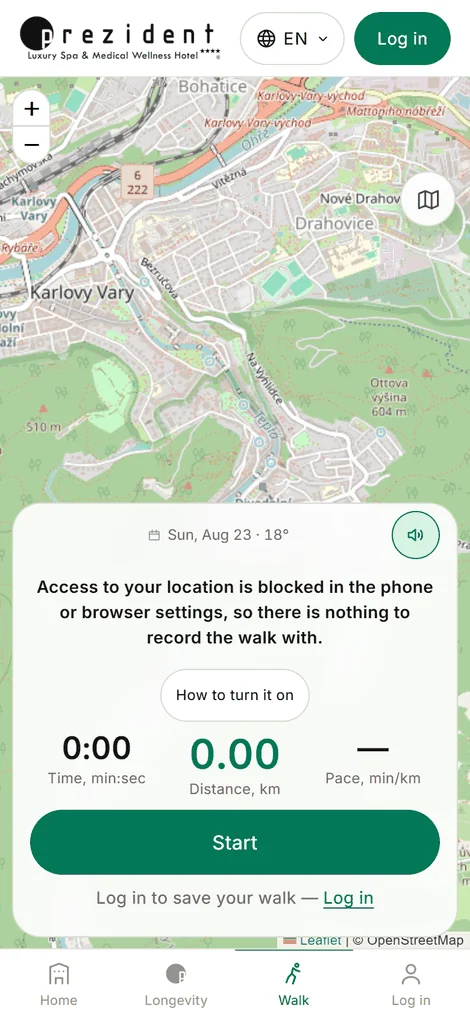
There used to be one line for every case, «Waiting for GPS signal» — and it lied: sometimes there is nothing to wait for. Now the reason is named, with a «How to turn it on» button beside it carrying the instructions for your phone in particular.
«Access to your location is blocked» — permission was never given, was withdrawn, or the browser blocked it. Cured in the phone's settings, see below.
«The phone cannot work out where it is» — location is switched off in the phone itself, or a battery saver is smothering it.
«Only an approximate location» — access is there, but precision is off: the phone hands over a district instead of a point. On Android that is «approximate location», on an iPhone a disabled «Precise Location». A route cannot be recorded from it.
«Waiting for GPS signal» — this one is honest waiting: the phone is looking for satellites. The first cold search without internet takes up to three minutes; stepping out from under the trees helps.
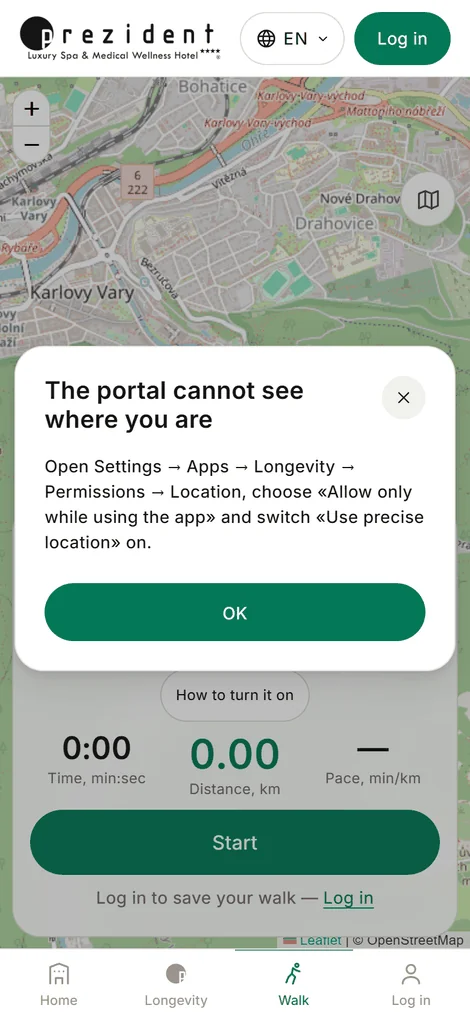
The reason is named outright, with the instructions one tap away×Instructions for this phone exactly: Android, the portal from the Home screen×
How to turn it back on
There are four roads, and the portal picks yours — by the phone and by whether it is open as a tab or stands as an icon on the Home screen. The latter matters more than it sounds: an app from the Home screen has no address bar and no padlock in it, and the only road to the permission runs through the phone's settings.
Android, the portal from the Home screen. Settings → Apps → Longevity → Permissions → Location → «Allow only while using the app», and switch «Use precise location» on.
Android, the portal as a Chrome tab. The icon left of the address bar → Permissions → Location → allow. If there is no such line: Chrome menu → Settings → Site settings → Location → app.karlovyvary.info.
iPhone, the portal from the Home screen. Settings → Privacy & Security → Location Services → Longevity → «While Using the App», and switch «Precise Location» on.
iPhone, the portal in Safari. The same place, but the entry is called «Safari Websites»; plus, in Safari itself, tap «aA» left of the address and allow location under Website Settings.
Nothing to come back and press
The portal notices your return from the settings by itself: the complaint leaves the screen the moment access appears, and the walk can begin. If a recording was already running it carries on from where you are standing — the gap stays in the track, and that is honest: there the phone did not know where it was.
It treats a silenced signal the same way. If points were arriving and suddenly stopped — which happens after an accidental flight mode or a battery saver kicking in — the tracking is raised again on its own after half a minute of silence. Nothing needs restarting by hand.
A weak signal: approximate kilometres
Not every point goes into the track. Along with the coordinates a phone reports how much it trusts them, and a point it doubts by fifty metres is not a place you walked: such points draw a zigzag through blocks you never entered and inflate the distance. The usual bar is 45 metres.
But a bar the phone cannot clear at all would mean no track rather than a clean one: down in the Teplá gorge a weak handset honestly holds 60–80 metres for a whole walk. So after a minute without a single precise point the bar rises to 120 metres — an approximate trace is more honest than an empty screen. A quiet line appears under the numbers at that moment, «The signal is weak: the walk is being recorded, but the distance is approximate», and the moment a precise point arrives the bar drops back on its own.
Above 120 metres the portal will not go under any circumstances: beyond that the position comes from cell towers and Wi-Fi rather than satellites, and that is not a trace but an area the size of a city block.
What the desk does
The hotel's own kit phones are prepared in advance: location permission and precise location are already on, and the guest has nothing to set up — see setting up the kit. With your own phone it is enough to answer «allow» once, to the very first «Start».
If a guest shows the complaint at the desk — press «How to turn it on» and walk through it together: it is already written for their phone, and nothing needs inventing.
Related
The walk screen — what each number means and how the portal leads along the line.