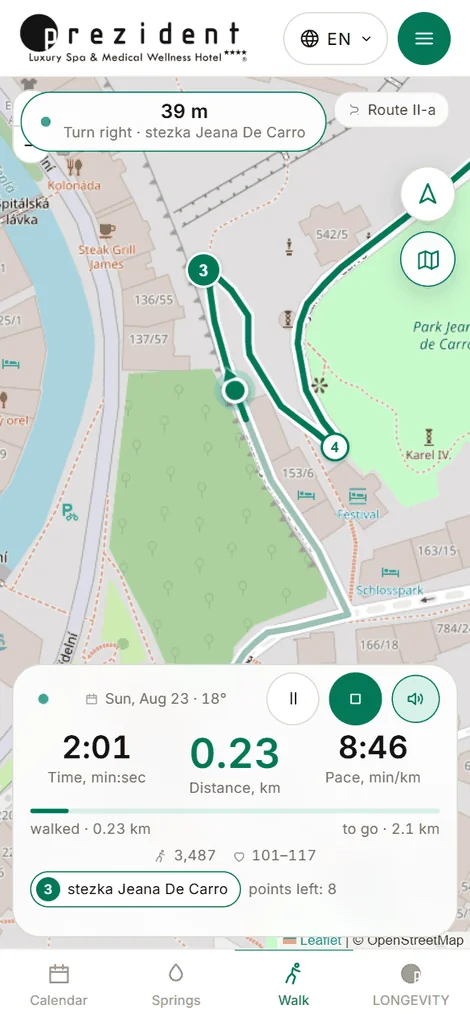
On the move the screen does one thing — the map. Your own point stays in the centre, the route runs under it, and whatever the portal has to say appears one thing at a time and large: the next turn on top, three numbers below.
It leads along the line, not «roughly that way». It keeps working out where on the route you are, and from that follow the turn prompt, the off-route warning and the share of the route walked in your report.
Recording: the turn on top, three numbers below, your point in the centre×
The three numbers
Time, min:sec. How long the recording has run. Minutes and seconds: «14:58» is fourteen minutes fifty-eight seconds, not fourteen hours. Past an hour the label becomes «h:min:sec».
Distance, km. Walked, from the phone's track. It may differ slightly from the watch: that has its own recording and its own sensor.
Pace, min/km. Minutes spent per kilometre. On foot that is usually 10–15; uphill it is more, and that is as it should be.
The line under the figures
In small type below the three figures stands the same thing the watch face carries, so nobody has to look at their wrist for the date and the weather: the day, the outside temperature, today's steps and the pulse corridor. Each appears only when it genuinely exists — the weather comes from the portal, the steps from the last watch poll, and a route visitor without an account has no steps at all.
There is no live pulse here, and that is a decision rather than an omission: a phone does not measure it, and a half-hour-old figure beside a running distance would read as «now». The current number is on the wrist, where it is measured — why.
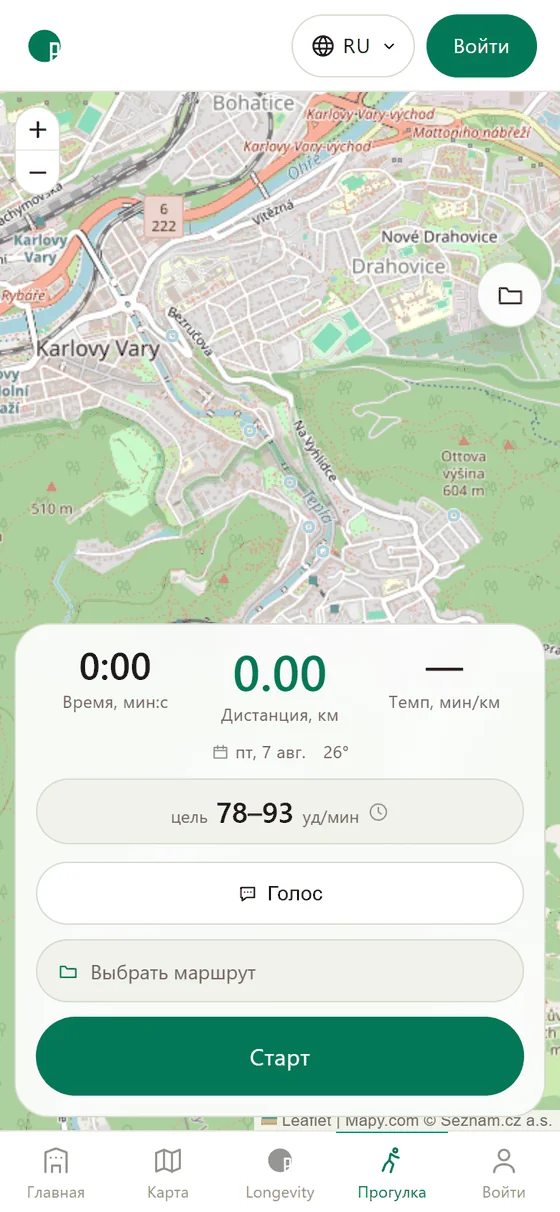
In the header of this screen the full wordmark gives way to the hotel's mark in a circle: the walk screen is a map across the whole glass, and the wordmark was taking a strip of it away.
With a route chosen there is also a bar under the figures: walked on the left, and on the right the rest of the line with a rough time to the finish, «~25 min». The time comes from your own pace, stops included; for the first three minutes it assumes an ordinary 4 km/h.
Before setting out: the mark in a circle above, the day, temperature and corridor below the figures×
The map
Your own point stays in the centre and the arrow shows where you are heading. The route is drawn in green with a white casing, so it reads over any map underneath; your own track is gold.
Move the map with a finger and the following lets go — a round crosshair button appears in the corner. Press it and your point is centred again.
Near a turn the map zooms in by one step by itself — the junction with all its exits fills the screen — and goes back once the turn is behind you.
If the GPS signal has been gone for more than twenty seconds, your point turns grey and loses its arrow: it marks where the phone last saw you, and «Waiting for GPS signal» is back under the figures. When the signal returns, the point is live again.
The voice
Off by default: a talking phone in a pocket is a surprise. Turn it on with «Voice» before the start, or with the round button in the panel's corner on the way.
What it says: a greeting with the route's length and your pulse corridor, turns — sixty metres ahead and at the turn itself, whole kilometres, «you have left the route», and the summary at the finish. The rest of the time it is quiet.
If your phone has no voice pack for your language, the portal says the same thing in English: in a forest, English is better than silence. The on-screen prompts stay in your own language.
At every whole kilometre the voice also gives the time you will reach the finish — at your own pace, stops included.
Sometimes your language does have a voice on the phone, but one that only works online (Google's voices in Chrome are like that). The screen then warns you before the start: without a connection the prompts will be in English, and the voice itself can be downloaded beforehand in the phone's text-to-speech settings.
If you take a wrong turn
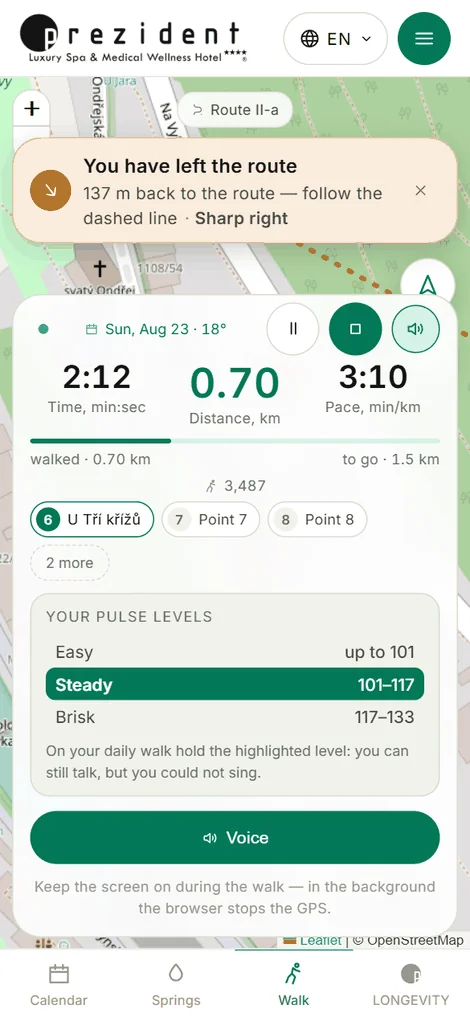
More than forty metres from the line and the portal says «you have left the route» and shows a bar with the distance back to it. On the map a dashed line runs from you to the route — follow it. The voice repeats every half minute until you are back; at twenty-five metres it tells you the line is under your feet again.
Forty metres rather than ten is deliberate: on a serpentine the next loop of the same trail passes forty metres away, and a stricter threshold would cry wolf.
Leaving the route cancels nothing and ends nothing: the recording runs, your track is written as it is, and the dashed line simply shows the way back. You need not go back at all — the walk survives either way; only the «% of the route walked» in the report will be smaller.
The dashed line leads forward along the route — to the nearest point you have not walked yet, not back over ground already covered: that is how Komoot and OsmAnd do it. It leads to the nearest point of all only when the unwalked part is much farther away.
«You have left the route»: the distance in the bar, the dashed line on the map×
The pulse is on the watch
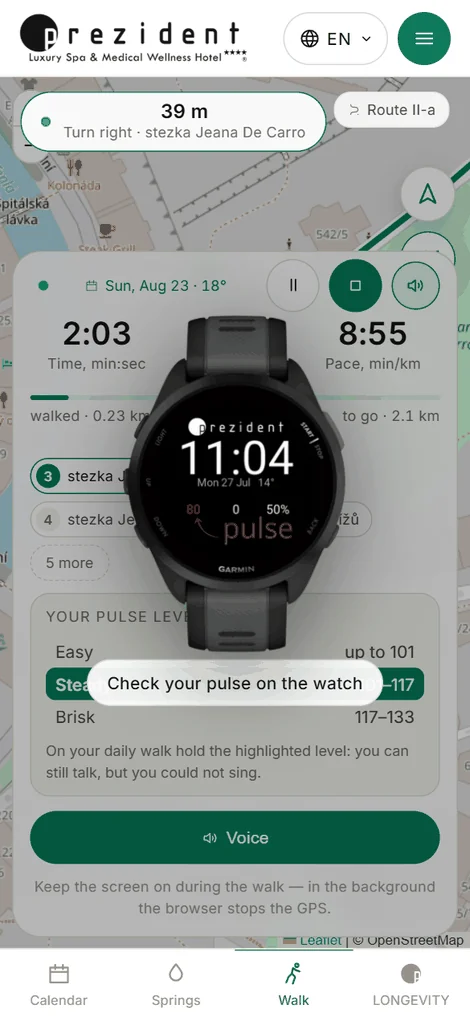
The phone does not measure your pulse — the watch writes it. So at the start of the walk the portal says «keep an eye on your pulse on the watch» and the watch itself slides onto the screen for five seconds, to show where to look. After that you can call it up yourself: tap the pulse-corridor row in the open panel.
How to read the pulse on your wrist and where the corridor comes from — in The pulse corridor.
«Keep an eye on your pulse on the watch» — the reminder at the start×
The panel
On the move it shrinks to three numbers and two buttons — the rest of the screen belongs to the map. The handle on top opens it: the pulse corridor, the voice switch and the note about the screen.
That note is not decoration: in the background the browser stops the GPS, and the walk quietly ends where the screen went dark. The portal keeps the screen awake by itself, but if the phone does fall asleep the recording resumes the minute you wake it.
And above all: the phone has to come with you. Left in the room it records the time but not the path — the card then shows half an hour and three hundred metres in a straight line. The pulse does not suffer, the watch writes that; and the portal recognises such a walk and says so on the card itself.
If the phone did fall asleep and got no GPS signal meanwhile, on your return you will see for how many minutes the walk was neither guided nor recorded: the track has a straight line there.
Without the internet — and with it
Everything that leads you works offline. The town's map is downloaded into the phone right after you sign in; the route's line and every turn are in its memory too — the portal worked them out in advance instead of asking along the way. So in the woods and under the colonnade the screen leads exactly as it does on the square: the map draws, the turn is announced, leaving the route is noticed, the voice speaks. None of those calculations reach for the network — the phone does them itself.
The internet is needed once, at the end. Press «Finish» and the walk goes to the server, which builds the card. If there is no signal at that moment the walk waits in a queue inside the phone, the screen says it will be sent by itself, and it leaves the first second the network returns: at the hotel, on the tram, the next day. Nothing can be lost meanwhile — it is already recorded.
What a signal on the way does give, when there is one: the card opens straight after the finish, the pulse from the watch arrives sooner, and map tiles beyond the downloaded town are drawn as you go.
While there is a connection, the phone stores a strip of map along the path you are walking — to a sight or to the start of a route — so the map does not end at the edge of the forest where the signal goes. Where no detailed map is stored, it is drawn from a wider zoom: softer, but with streets and the river rather than a blank sheet. On a single bar of signal the map waits for the network no longer than eight seconds — it shows what the phone holds and fills in when the network answers.
With no connection at all, «Offline…» stands under the figures: the map, turns and voice run from the phone's memory, and the walk will be sent by itself once the network is back.
Navigating with Google Maps or the hotel map
Google Maps can guide your walk. Press «Start» and the Google app opens with the route: up to 9 points along the way, starting where you stand. Google navigates and the portal records: the time, the kilometres and the path appear in your account afterwards.
In a hotel with its own maps there is a choice above «Start»: «Google Maps» or «Hotel map». The hotel map knows the forest trails and navigates offline, so forest routes open with it. The portal remembers your choice.
While Google navigates, the portal's voice stays silent so that two voices do not talk at once. The panel shows «Google Maps is guiding · recording» and an «Open Google» button: it takes you back into navigation with only the points you have not passed yet.
The portal finishes a forgotten walk by itself. Reach the finish and the walk is over. Stand still for 15 minutes and the portal asks whether to finish; with no answer for another 15 minutes it finishes at the moment you last moved. Ride faster than 15 km/h for more than 2 minutes and the walk pauses. After 4 hours it finishes by itself.
In a browser, recording may stop while Google is on screen. Come back to the portal to finish the walk.