The phone guides the walk by voice with no network at all; the watch writes the night. What to switch on on the phone and what must be switched off on the watch — step by step, with screens.
There are two phones in this story, and they must not be confused.
The kit's phone. It travels with the watch to the guest's room, lives on the charger and serves as the bridge to the Garmin cloud: as long as it is near the watch and charged, sleep, HRV and respiration leave by themselves. It is handed over locked — the PIN stays with the hotel. The guest has no reason to unlock it: syncing works through a locked screen.
The phone that goes on the route. For a guest on the programme that is their own phone: the portal opens in the browser and nothing has to be installed. For a longevity-route visitor it is the phone handed over at the desk together with the watch, portal already open.
What follows is about the second one — the phone that walks into the woods. A guest's own phone is shown the same two steps at the desk in a minute; the hotel's phone gets them once, when the kit is set up, not at every handover.
The phone measures no pulse at all. The pulse is written by the watch on the wrist, and on the walk the guest looks there, not at the screen; the phone only follows the line and speaks. What exactly arrives from the watch is in What the watch measures.
Step 1. The portal as a Home screen shortcut
The phone is a Samsung Galaxy, the browser is Google Chrome.
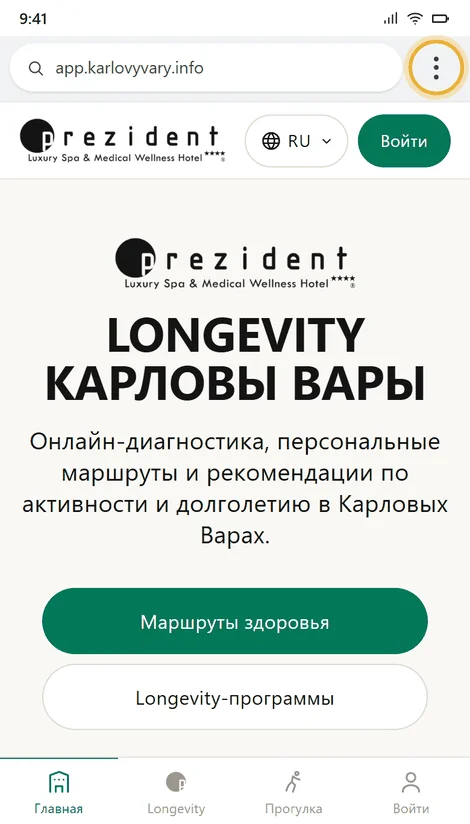
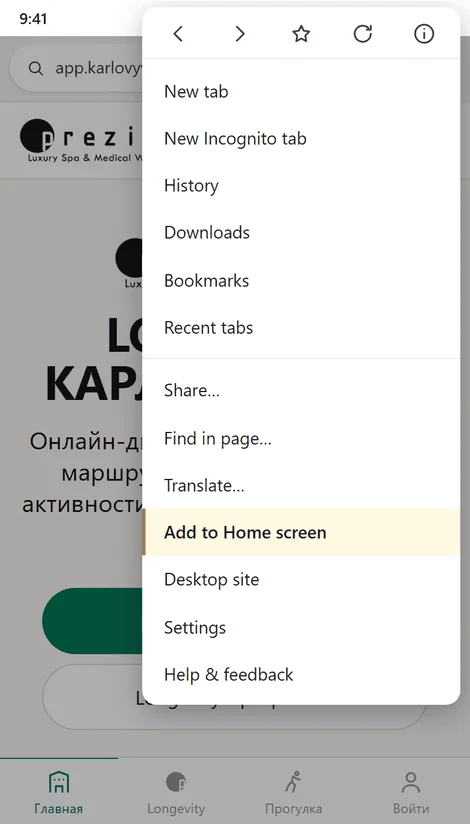
Open app.karlovyvary.info, tap the three dots right of the address and choose «Add to Home screen». In recent Chrome versions the same item is called «Install app» — it is the same thing.
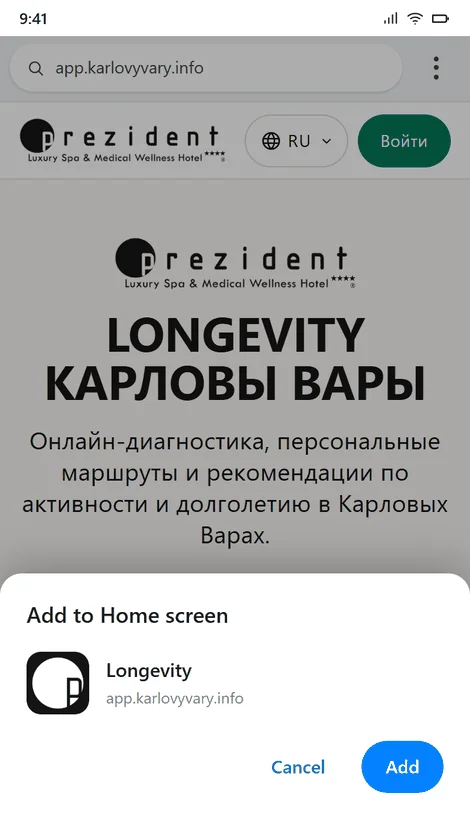
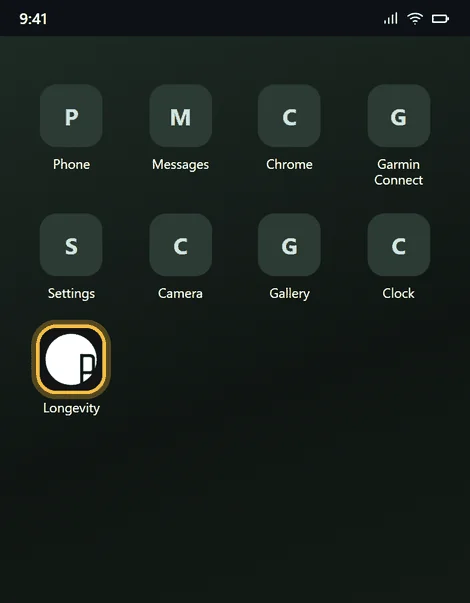
Chrome shows a sheet with the hotel's mark and the name Longevity. «Add» — and the shortcut takes its place among the other apps.
The portal open in Chrome. The three dots sit right of the address×The item is near the end of the menu, under «Translate…»×The sheet: the hotel's mark, the name Longevity and the address. «Add»×The shortcut on the Home screen — the portal is opened from here from now on×
Why a shortcut and not a bookmark. Opened from the shortcut, the portal takes the whole screen: no address bar, no other tabs, nowhere to wander off by accident. The map of the walk gets back the fifty points of height the browser bar was eating. The memory is the very same one — bookmark and shortcut live in the same Chrome, so the downloaded city and the queue of unsent walks stay where they were.
There is one trap, and it is about updates. The portal is updated often, and a fresh build has to be fetched once while there is a network. The rule is simple: after an update, open the shortcut once inside the hotel, on Wi-Fi — and only then leave. Otherwise the woods get a blank page instead of the walk screen.
The map and the turns download themselves. After the first open the portal quietly takes the city map — some two thousand tiles — and the walking paths the prompts are computed on. Keep a new phone on Wi-Fi for a few minutes and the walk guides with no network: the line, the turns, «you have left the route». The voice is the one thing fetched by hand — that is step 2.
And the one thing never to do: clear Chrome's data. The downloaded city, the route prompts and the walk that has not reached the server yet all go with it.
Step 2. Voices — so the phone speaks with no internet
The portal guides by voice: «in 60 metres bear left — Sadová», «stairs», «you have left the route». The phrases themselves exist in all 36 languages and travel with the app, but it is Android that pronounces them, not the portal. So the only language heard out loud is the one whose voice was downloaded beforehand.
Everything else the woods need is ready without us: the city map downloads itself, the turns are computed in advance and lie in a file beside the route — see The walk screen. The voice is the one thing switched on by hand, and the one thing that belongs to the phone rather than to us.
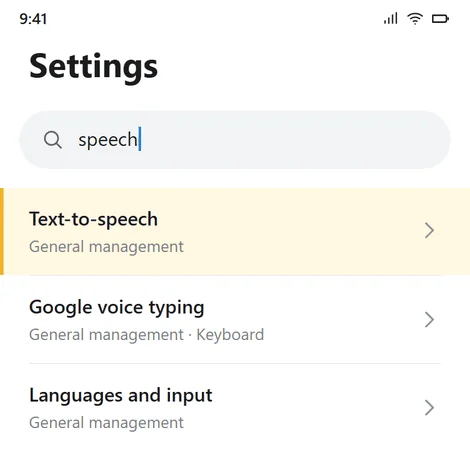
The shortest way there is the settings search: Settings → magnifier → «speech». On a Galaxy the item sits in «General management» and is called «Text-to-speech».
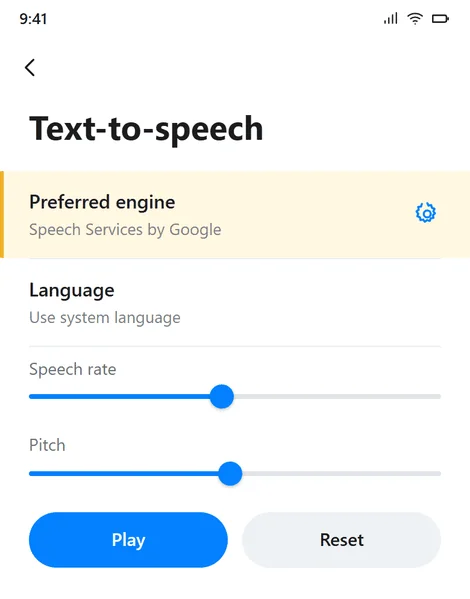
Searching the settings for «speech» is shorter than walking the sections×The preferred engine and the gear beside it×
One engine is chosen. A Galaxy keeps its own Samsung engine next to «Speech Services by Google». They have different language sets and different downloads, and a voice downloaded in one does not exist for the other. We set «Speech Services by Google»: it has more languages and it is the same on every phone of ours.
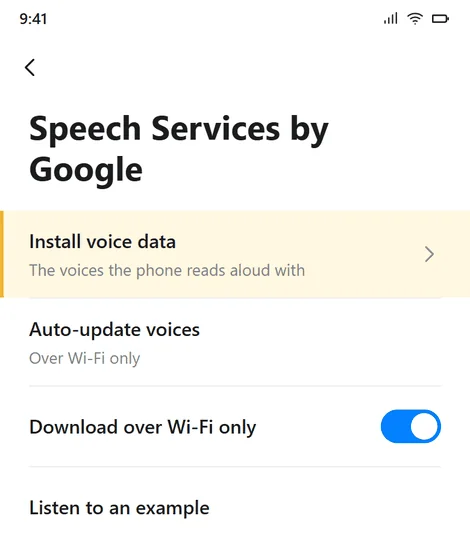
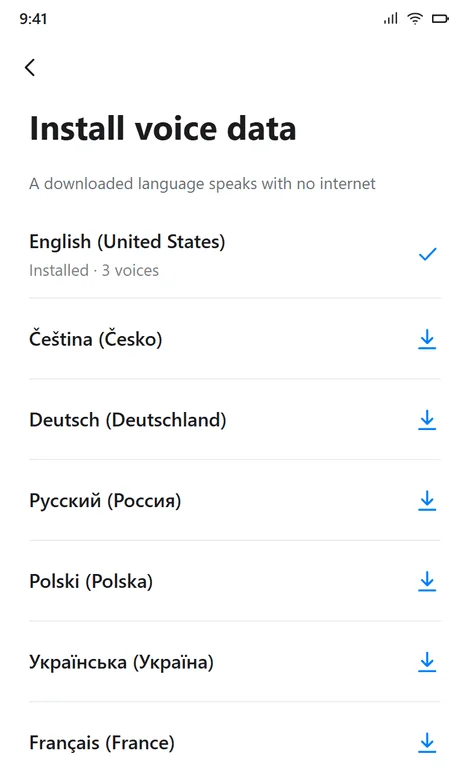
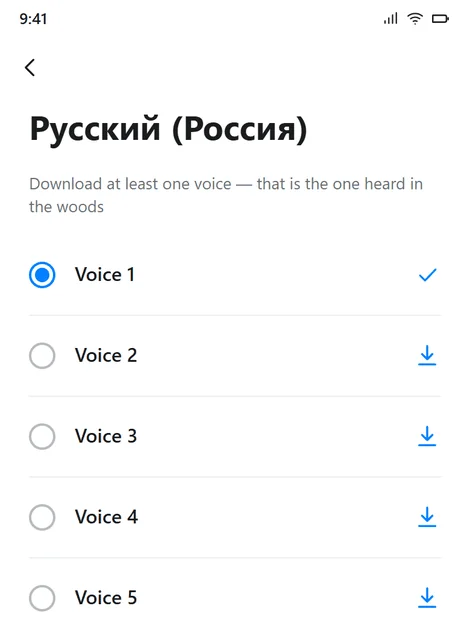
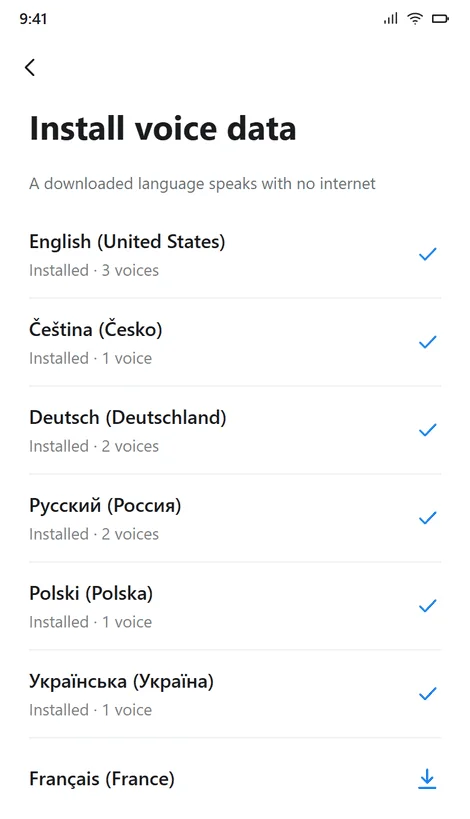
Then the gear right of the engine → «Install voice data» → language → the down arrow. One voice per language is enough: there are four or five and they differ only in timbre.
The engine's own settings: «Install voice data»×A down arrow — not downloaded; a tick — downloaded×The voices of one language. One is enough×A finished phone: the languages that matter are ticked×
Download over Wi-Fi: a voice is tens of megabytes per language. Leave «Auto-update voices» on «Over Wi-Fi only», so the phone never reaches for an update on mobile data in the middle of a walk.
If a language has no arrow in the list, Android has no offline voice for it at all. That is neither a broken phone nor an unfinished portal — it is how Android is built, and what the guest hears instead is written below.
Which languages to download
All thirty-six are not needed on a phone — they would not fit either. The order is this:
English — always, and first. It is the fallback: the phone speaks it whenever the guest's own voice is missing.
The languages of the house: Czech, German, Russian. Most people arrive with one of them.
The languages of the current stay. The desk knows who is in the house this week: if a guest arrives with a language the phone lacks, the voice downloads in a minute — beforehand, not while the person is already standing at the start.
What the guest hears and sees:
Their language's voice
What is spoken
What is on the screen
Downloaded
Their language
Their language
Exists in Android, not downloaded
English
Their language, plus a grey line «This phone has no voice for your language — the prompts stay on screen»
Android does not have it at all
English
The same
The bottom row is the point of that table. The screen never switches to English: the turns, the metres back to the line and «you have left the route» stay in the guest's own words even when the voice is a stranger's. A silent phone in the woods is worse than an English one — and a silent screen never happens at all.
How to check it worked
The check takes a minute and is done before the phone leaves the hotel.
Turn on flight mode — that is exactly what the woods are. Wi-Fi and mobile data both off.
Open the shortcut (not a Chrome tab), pick a route, switch «Voice» on and press «Start». The greeting must be heard.
Voice is off by default — a phone talking from a pocket is a surprise, not a kindness. The guest turns it on before leaving; on the move the same switch is the round button in the corner of the panel.
Until «Start» is pressed the phone stays silent. That is how a browser works: the first phrase must be born of a human tap. Nothing is broken and nothing needs adjusting.
The volume is the media one, not the ringer. A phone on vibrate reads aloud just the same; media volume at zero does not.
A grey line «This phone has no voice for your language» means the language was not downloaded. Go back to step 2; meanwhile the portal speaks English.
Step 3. The watch: the first start
The phone is ready — the watch is next. The whole order, with screens and with what happens at each step, is in The hotel's watch: how to start it; here is only the list, so that nothing is forgotten.
Garmin Connect on the kit's phone is signed into this kit's account and no other. The app holds one account at a time — which is why phones are never swapped between kits.
Both Connect IQ apps — the watch face and the walk app. From the store on the kit's phone, or as a file over USB.
The watch face is selected and the glance tile is added to the loop: Connect IQ glances never get there on their own.
The pairing code is entered — six figures from the kit's card. Until it is, both apps say plainly that the watch is not linked to a cabinet.
The kit's card in the admin panel says «watch online». That is the proof that everything met.
Step 4. The watch: switch the night sleep screen off
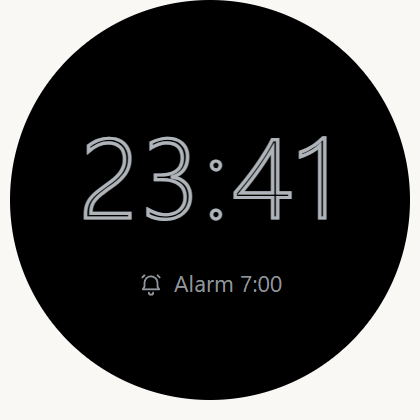
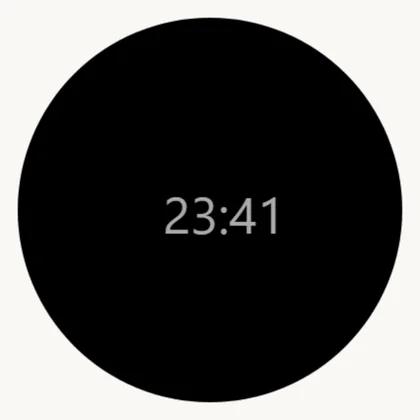
A Garmin watch has a night mode of its own. Inside the sleep window — set by the sleep schedule, around ten in the evening on our kits — the watch replaces whatever face is chosen with a minimal sleep screen: hollow digits and an alarm line. From that minute our face stands still until morning, and the day's feed stands with it.
At home that is a courtesy to the owner; on a kit it is a trap: the guest lifts a wrist past ten, sees bare digits instead of the familiar screen and brings the watch to the desk in the morning — «the face is gone». The watch is fine, the pairing is intact, there is nothing to repair: it is a setting, and it is switched off once, when the kit is set up.
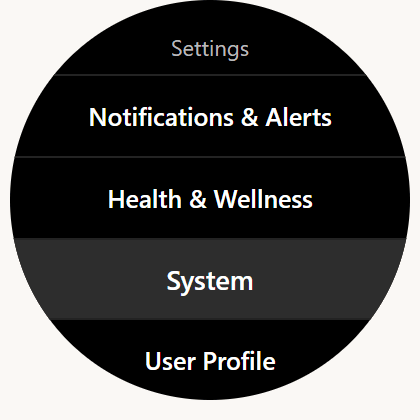
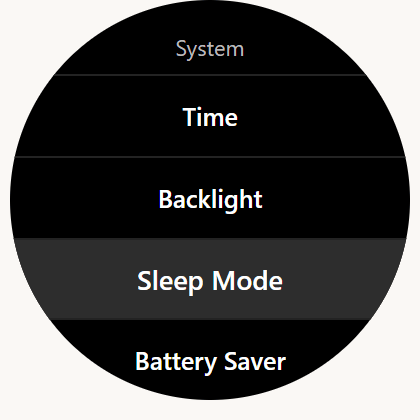
On the watch: hold UP → Settings → System → «Sleep Mode».
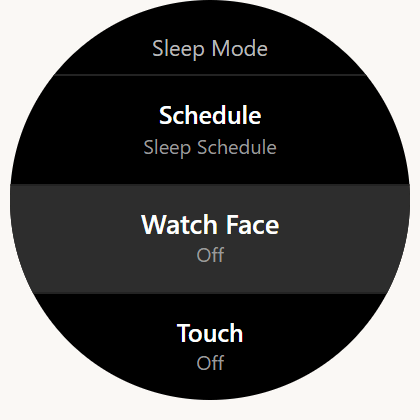
Set «Watch Face» to «Off» — that is the sleep screen. Switched off, it leaves our face on the glass all night.
The neighbouring item, «Battery Saver» — check it is not on for the night: it takes the face down for a reason of its own, the charge.
The names drift a little between firmwares. The landmarks are the words «Sleep Mode» and «Watch Face» under «System».
The night mode left on: hollow digits and an alarm instead of the face×Hold UP → Settings → System×Under «System» — «Sleep Mode»; «Battery Saver» lives right next to it׫Watch Face» — «Off». That is the sleep screen×Switched off: our face stays the night — with the wrist down it draws little anyway×
Sleep itself is untouched: sleep, HRV and respiration are measured by the sensors, not by the screen, and they read the same under any face. The cost in charge is small: with the wrist down our face draws only the bare minimum — the rules of an AMOLED screen, see The watch face.
One thing to remember: a factory reset brings the sleep screen back. After a reset, walk this step again, along with the rest of starting the watch.
Step 5. The handover: the watch goes on the wrist
The watch is not handed over in its box — it goes onto the guest's wrist right at the desk, strap adjusted. A kit that left for the room in a box usually stays there: the connection is alive, nothing is measured, and the panel says «it does not seem to be worn».
And one sentence at the handover — the most important of the whole conversation:
«Keep the watch on overnight — sleep is the main measurement of the programme.» At night the watch measures sleep, resting pulse and recovery; these are the figures the doctor reads in the morning and changes procedures by. A night without the watch is an empty line on the morning sheet.
The watch comes off only for the sauna and the thermal water — and goes straight back on the wrist afterwards, not «in the evening».
If the guest does not want to wear it, that is their right: mark «Guest declined» on the panel, and the portal stops reminding both them and you.
How it looks to a person
The guest takes the phone with the hotel's mark on the shortcut and taps it. The portal opens full screen at once — no browser in sight, no address to ask for, nothing to type.
They pick a route, switch the voice on and press «Start». After that the phone can go into a pocket: it will say «in sixty metres bear left» by itself, warn about the stairs by itself and notice by itself that the person turned the wrong way. The pulse is written by the watch all this time — the guest lifts a wrist and sees the figure and the corridor to hold it in.
Halfway round the route the network usually disappears, and nothing changes: the map is already in the phone, the turns were computed in advance, the voice comes out of the phone itself. A walk finished with no network is answered with «The walk is saved on the phone», and the portal sends it itself the moment the person is back in the hotel.
What the desk does
The phone is prepared once, when the kit is set up. At the handover the watch goes onto the guest's wrist (step 5), and on the phone three things are left to check, all three take half a minute:
The shortcut is on the Home screen and the portal opens from it, not from a browser tab.
The guest's language is downloaded. If not — either download it now, or say so plainly: «the phone will speak English, the writing stays in your language».
Media volume is not at zero and no headphones are still paired with somebody else's phone.
A guest's own phone is shown the same two steps at the desk: the shortcut and the voice of their language. It is the only thing a guest on the programme is ever asked to do.